
SensorsDjin
On-device sensor capture lab for iPhone.
SensorsDjin turns an iPhone into a portable engineering lab: record camera, audio, motion, GPS, barometer, ARKit pose, LiDAR depth, and synchronized telemetry on one device clock, then replay, map, and export open MCAP or GPX files.
iOS 17+. iPhone Pro hardware unlocks the richest capture set, including ARKit camera pose and LiDAR depth where supported.
SensorsDjin is an engineering capture and analysis tool. Recorded telemetry depends on device hardware, permissions, sensor availability, and field conditions.
What it does
Synchronized capture
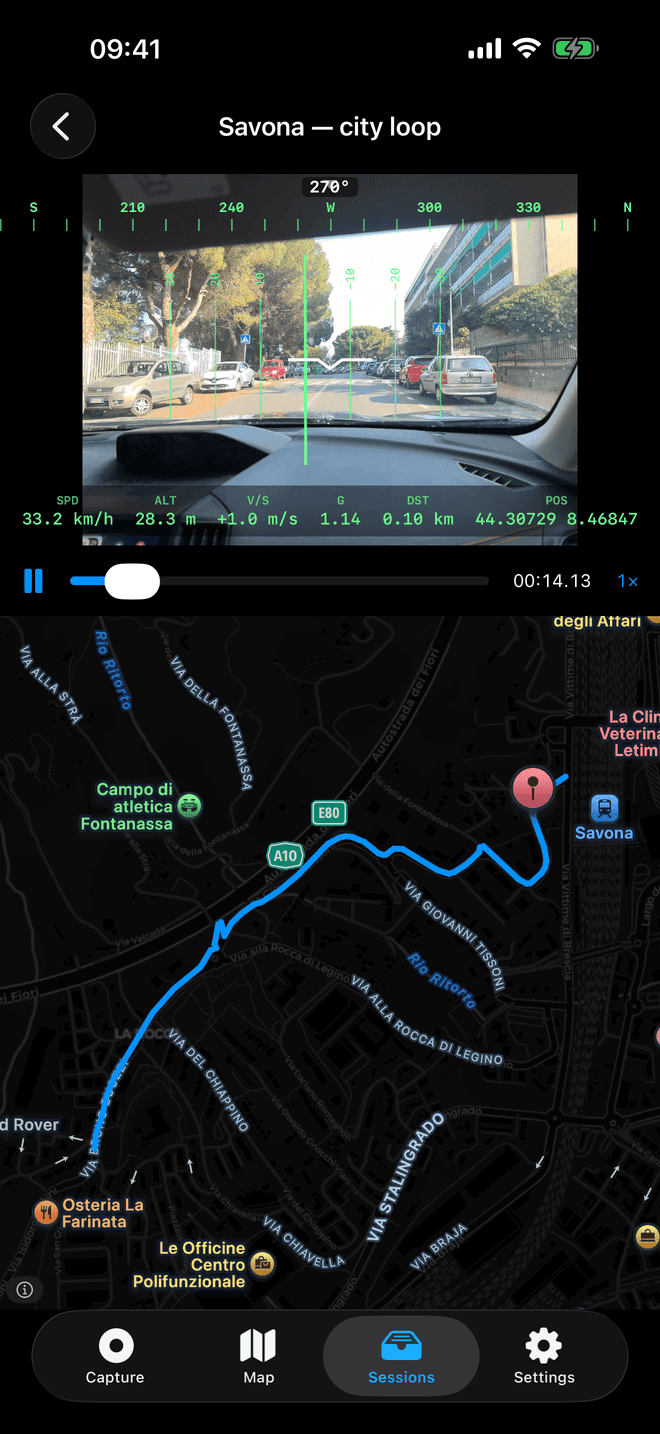
Camera video, AAC audio, IMU, magnetometer, GPS, barometer, fused attitude, ARKit pose, and LiDAR depth are recorded on a shared monotonic timeline.
Live instruments
Capture sessions can show an artificial horizon, heading tape, speed, altitude, accuracy, and realtime sensor tiles while recording.
Replay and maps
Recorded sessions replay with a synchronized on-screen overlay, scrubber, speed control, and map trace over OpenStreetMap tiles.
Open export
Each session can be shared as a zip containing HEVC video, a documented MCAP data file, and a manifest, or exported as a standard GPX trace.
Field workflow
Record
Choose enabled channels, press record, and capture video plus telemetry into a session folder visible from the Files app.
Review
Inspect sessions through replay, trace maps, and channel lists to understand what was captured before exporting.
Analyze
Open the MCAP file in Foxglove Studio or custom tools, using session metadata to align monotonic time with UTC and GPS time.
Engineering notes
Standard data package
Sessions contain data.mcap, video.mov, and session.json, with MCAP topics based on Foxglove-compatible schemas and nanosecond timestamps.
Testable Swift core
SensorsDjinCore covers recording coordination, MCAP writing, GPX export, telemetry readers, sensor fusion, depth conversion, session storage, and zip packaging.
Native capture shell
The app target owns SwiftUI, AVFoundation, CoreMotion, CoreLocation, CoreMotion altitude, ARKit, MapKit/OpenStreetMap views, StoreKit, and permissions.
Privacy model
- Capture and replay run on the iPhone.
- Session folders are stored locally in the app documents area.
- Nothing is uploaded by the app; users decide when to export or share.
- Sharing uses the standard iOS share sheet for zip and GPX files.